vcap
skinless tab recording, driven from the devtools console.
download
[download] vcap-0.1.0.zip
chromium extension — unpacked install. chrome, edge, brave, arc, vivaldi, opera.
install
- unzip the downloaded archive
-
open
chrome://extensions, toggle developer mode on, click load unpacked, and select the unzippedvcap/folder -
open
chrome://extensions/shortcutsand confirm the hotkey is set (default ⌘⇧V on mac, ctrl⇧V elsewhere)
source
- github: github.com/Tor-Grimsson/kol-vcap
- issues, pull requests, and feature discussion live on the repo
- console reference:
vcap.help()inside any devtools console after install
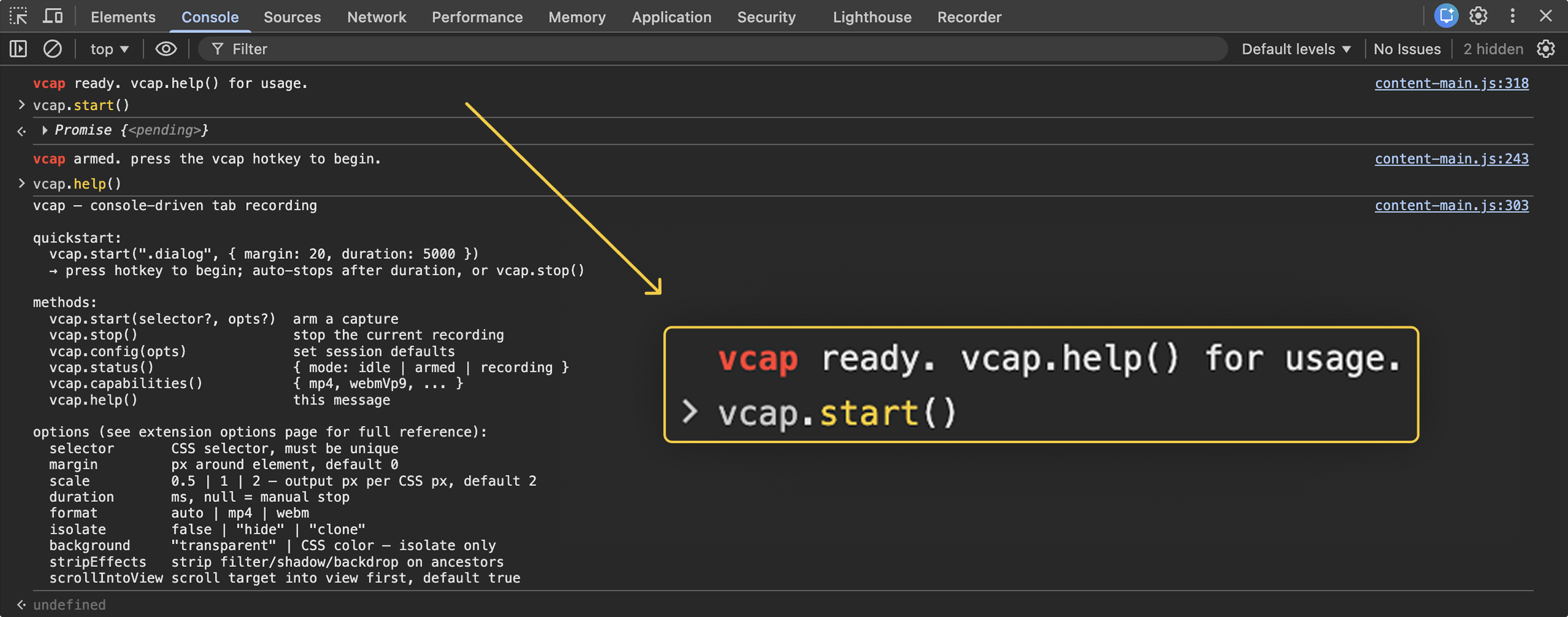
quickstart
- open devtools on any page ⌘⌥I / F12 → console tab
-
type a command and press enter
vcap.start('.dialog', { margin: 20, duration: 5000 }) - press the hotkey to begin. recording auto-stops after the duration (or press the hotkey again to stop manually). file downloads.
api
vcap.start(selector?, options?)-
arm a capture. validates the selector and options, applies isolation/scroll,
and stores the pending config. press the hotkey to actually begin recording.
accepts eithervcap.start('.selector', {…})orvcap.start({ selector: '.x', … }).
omitselector(or pass no args) to record the entire viewport. vcap.stop()-
stop the current recording. equivalent to pressing the hotkey while recording.
if auto-stop (
duration) is set, this isn't needed. vcap.config(options)-
set per-session defaults in the current page. later calls to
vcap.start()inherit these unless overridden. returns the merged config. vcap.status()-
returns
{ mode: 'idle' | 'armed' | 'recording' }. vcap.capabilities()-
returns the current browser's encoder support:
{ mp4H264, webmVp9, webmVp8, webmAlpha }. vcap.help()- print a compact reference to the console.
options
| name | type | default | notes |
|---|---|---|---|
selector | string | null | null | css selector. must match exactly one element. null = full viewport. |
margin | number | 0 | css px of surrounding context added to the crop rect. |
scale | 0.5 | 1 | 2 | 2 |
output px per css px. capped at device dpr (retina = 2).
use 1 or 0.5 for smaller files.
|
duration | number | null | null | milliseconds. null = manual stop via hotkey or vcap.stop(). |
format | 'auto' | 'mp4' | 'webm' | 'auto' | auto picks mp4/h264 when opaque, webm/vp9 when transparent. mp4 has no alpha — transparent recording forces webm. |
isolate | false | 'hide' | 'clone' | false | false = record in-context. 'hide' hides other elements via visibility. 'clone' is reserved (falls back to 'hide' in v0.1). |
background | string | null | null |
only valid with isolate. 'transparent'
forces webm. otherwise a css color string.
|
stripEffects | boolean | false |
removes filter, backdrop-filter,
box-shadow, mix-blend-mode on ancestors
of the target. recompose in post.
|
scrollIntoView | boolean | true | scrolls the target into the viewport before arming. |
filename | string | null | null | output filename without extension. null = timestamped. |
hotkey
default binding: ⌘⇧V on mac, ctrl⇧V elsewhere.
rebinding lives in chrome's native shortcut manager — it's authoritative,
so vcap doesn't try to reimplement it. paste chrome://extensions/shortcuts
into the address bar (chrome-scheme urls can't be linked from web pages) and edit the
binding there.
recipes
record a dialog with context
vcap.start('.dialog', { margin: 20, duration: 5000 })transparent capture of an isolated element
vcap.start('button.primary', {
  isolate: 'hide',
  background: 'transparent',
  stripEffects: true,
  margin: 12
})
quarter-size quick test
vcap.start('.hero', { scale: 0.5, duration: 2000 })full viewport, manual stop
vcap.start()pin session defaults (this page only)
vcap.config({ scale: 1, format: 'webm', margin: 16 })transcode webm → prores 4444 for editing
ffmpeg -i vcap.webm -c:v prores_ks -profile:v 4444 -pix_fmt yuva444p10le out.movnotes
-
vcap needs
<all_urls>content scripts sowindow.vcapis present in every page's console. no network access, no page data is transmitted. -
starting a recording requires a user gesture (the hotkey).
console calls to
vcap.start()can't start tabCapture directly — chrome blocks that for security. - mp4 in-browser (h264) does not support alpha. transparent output is always webm; transcode to prores 4444 if you need a davinci-friendly alpha file.
-
scaleabove device dpr (supersampling via the chrome debugger api) is not in v0.1. retina gives you 2x for free. - built for chromium browsers. not compatible with firefox or safari.
- the extension's own options page (chrome extensions → vcap → details → extension options) adds live panels the static site can't: defaults form, capabilities probe, recording history.
links
- vcap [vcap.kolkrabbi.io]
- the landing page you're on. hosted on vercel, packages the extension into a versioned zip on every deploy.
- github [github.com/Tor-Grimsson/kol-vcap]
- source. issues, pull requests, release tags.
- kolkrabbi [kolkrabbi.io]
- kolkrabbi vinnustofa — the studio behind vcap and the rest of the kol- toolchain.
- contact [kolkrabbi@kolkrabbi.io]
- questions, bugs, feature ideas. direct line.